Showing posts with label Affinity Designer. Show all posts

Thursday, May 21, 2020

My first vector self portrait


Every respectable portrait artist in the history of human art has at some point in his or her life created a self portrait. So I have been told. As a respectable portrait artist (cough!) I thought it is time to draw one myself. I chose a photo that was shot at X-mas eve of 2014 as a reference, because I've grown too ugly to show my mug in public since that time, lol. Still, some would say creating a self portrait is a sign of vanity. To make things worse, vanity is said to be one of the seven mortal sins. However when considering who decided what is sin and what is virtue - the so called 'gods', that deceiving, plundering, perverse and murdering lot, that do not give a flying fuck about human mortals, I do not worry too much about whether I am committing a sin or gracing life with a virtue. Common perception is an imposed deceitful heap of invented crap for braindead half wits to mindlessly believe and for the rest of mankind to smirk at and ignore. No one should take this personally, but maybe consider what's actually written here. It's the idea of having a brain. To use it every now and then.


Obviously the date mentioned in the image caption indicates that this portrait is a work in progress, that still needs a fair amount of work. The update sequence can be observed in my portfolio blog that you find here. I am creating this all vector, zero pixel self portrait in my trusty Affinity Designer, that allows to create realistic vector portraits like no other vector drawing program is capable of. Although I've been working with this program for about 4 years, I am still experimenting with it and in the case of this drawing I think it won't take too long to complete, because of the techniques used (and those I didn't use obviously). So stay tuned until I've finished this vain enterprise (and beyond that when I post consecutive articles of course).


Hasta luego online virtual folks. 


Monday, May 11, 2020

Why and how I make vector portraits


In the update sequence of the vector portrait of Mike Ehrmantraut (in Breaking Bad) I tried to describe why I change some aspects of a face compared to the reference photo that I use to create a portrait from scratch. This is what I wrote:

Some details, like the eyes, are intentionally drawn differently from what they look like in the reference image to enhance the visual impact of the image without giving up likeness. In every portrait the eyes determine 'the look' of the artwork. The choice of more or less differing colours can also be used to create a more dramatic effect. These are among my most used tricks to draw portraits that are more than just accurate copies of photographs. I prefer to create some sort of visual metaphor that reflects the way I perceive characters in an attempt to highlight the essence of their personality by revealing what (I think that) hides behind which is obviously noticeable at first glance, because everyone wears a mask, a fact of which some are not even aware that they do. I like to suggest to the observer to look beyond without encouraging to dissect in an invasive way, because when observing becomes judging one can no longer enjoy art.


Mike Ehrmantraut - Breaking Bad
Vector portrait of Mike Ehrmantraut


It is my visual signature that reflects from each portrait I make, a signature that contains aspects that always are there, but also features that are unique to every portrait that I draw. Long ago I felt that I was forced to abandon the idea to be consistent, because I came to the conclusion that it is an illusion. The powers that aim to control mankind tried to make it an unavoidable part of the 'reality' imposed on all who were lured into believing that they exist inside of it, because they thought it would offer them control. And while that paradigm works as long as enough people believed in it, it no longer does that when an increasing number of people do not.

And yes, even in what is deemed to be a trivial aspect of life (not necessary to survive that is) like art, the possibility to be in control of things, is what matters to those that want to be in control. They are the ones that made mankind believe that art is a mere secondary requirement for the perpetuation of life. For those perceptive enough to understand that 'reality' is an imposed illusion, the intentional act of downplaying the significance of art, is part of the mechanism to maintain the power structure in which life has been trapped. To those to whom this claim sounds like a tin foil hat indulgence, I would like to say that more incarnations are needed to begin to understand what I wrote here.


Francis Bacon


While many believe that the cliché 'a picture says more than a thousand words' is true, sometimes the opposite is true, because human language - in this case the intentionally constructed English linguistic means of communication - has inbuilt mechanisms that refer to a wide range of meanings that only those aware of etymology and neuro linguistic programming understand. Therefore words are capable of painting a picture inside the mind of observers that says more than a thousand words can - creating a loop, which is nature's favorite way of expressing things, by way of patterns.

So what has become an unrelated matter in the fudged human perception, may have a completely different role in the evolution of life when perceived from a different angle. This of course does not apply to art only, but to countless other aspects of life. On the one hand millions are paid for specific artworks, while on the other hand art in general is marginalized. It is the common method used to hide things in plain sight, which causes many to be blind to certain things while having 20/20 vision. The same principle works in almost any situation; people can stare at things for hours in a row without seeing what is obvious to those fortunate enough to have been blessed with the gift of seeing. It distinguishes the vision of those that look and those who see.

Finally, why I prefer to create portraits using vectors instead of pixels. It is well known (in the graphics community) that vector images can be re-scaled to any size without loss of quality, while pixel images become blurry, while edges it contains become jagged and grimed with stray pixels of strange colour. This is the result of the fact that vector shapes and strokes are based on mathematical formulae that simply recalculate objects when re-scaled while pixels have absolute coordinates in an image that confuses software when re-scaled.


Nikola Tesla


Affinity Designer allows to blur edges which causes the mind of the observer to find images with such properties realistic. The meta-information of vector images is closer to nature when limiting properties, like being able to render hard edges only, are removed. It is why I prefer to use this type of art creation. In addition the functions that require certain values to be assigned to them, can be given numbers that Nikola Tesla preferred (numbers divisible by three) or numbers of vortex math, re-discovered by Marko Rodin. These methods make hiding things in plain sight easier, while what is hidden, is beneficial to life, not hostile, even when depicting an actor that plays a role of one that is not so friendly to some. For technical details of making vector portraits I refer to the entries in my portfolio blog.


Wednesday, May 6, 2020

Affinity Designer and Inkscape have over taken Adobe Illustrator


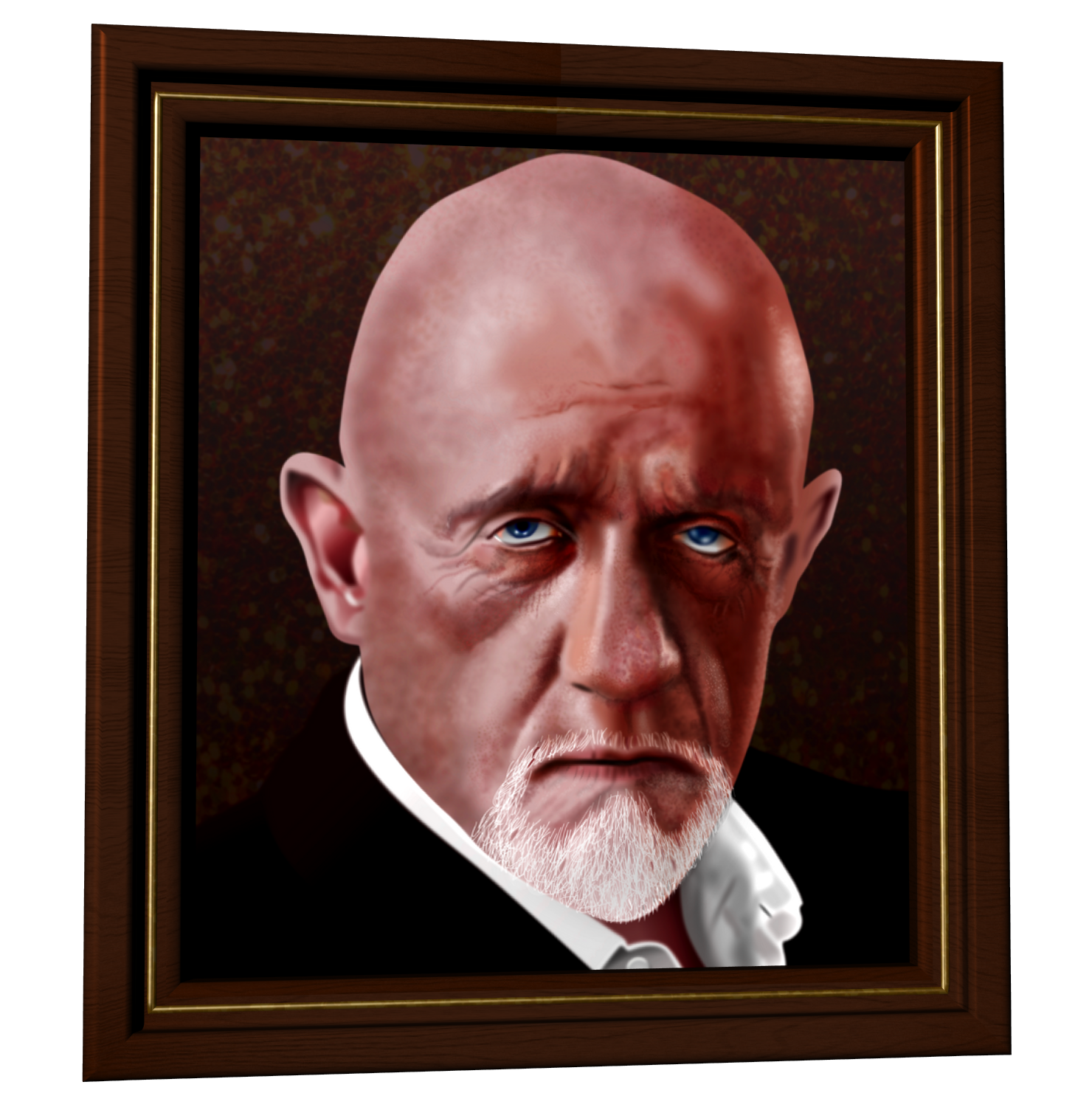
Impressive acting by Jonathan Banks as Mike Ehrmantraut in 'Breaking Bad'. I am in the process of creating a realistic vector portrait of Banks in Affinity Designer after which an other portrait of Banks will be made in recently revamped Inkscape to see what the differences may be. Both programs seriously challenge Adobe Illustrator and many would say they have already passed the former king of the graphical world. Designer's and Inkscapes development advances faster most likely because Illustrator's devs struggle with legacy code that makes it bloated and forces them to invent work arounds which makes it even more bloated and as a result slower, requiring more clicks of the users to get things done.


Vector portrait of Jonathan Banks

Vector portrait of Jonathan Banks as Mike Ehrmantraut in 'Breaking Bad'


Above is a screenshot of the 8th stage of the creation of the vector portrait of Mike Ehrentraut in Affinity Designer. It is a work in progress at this point ((May 7 2020). So far I have been working 4 or 5 hours at it. The principle is the same as in my airbrush days - determine the average colour of an area and later add the darker and lighter parts and finally the details. Only difference is that Designer offers me countless undo levels and a history function that allows to go back to a certain point and from there design into a different direction, which was not possible in the old airbrush days. I will post all stages in my portfolio blog once the portrait has advanced to a reasonable stage. Stay tuned.


Hasta luego online virtual folks.


Friday, May 1, 2020

Affinity Designer - a better way to draw realistic vector portraits


One of the biggest challenges for artists that work with vector drawing programs, is to create realistic portraits. Usually they look like the image below, containing hard edges that artists try to disguise by placing a number of layers on top of each other with slightly different colours or with very contrasting colours to suggest that it is artsy art (which I think is horrible). In spite of these tricks the portraits remain hideous, although certain software producers have tried to promote this flawed type of 'art' to the standard of vector portrait drawing, so that it could continue to sell its software that actually is not capable of drawing proper realistic portraits.


Compilation of ugly vector portraits with hard edges


At some point the vendors of vector drawing programs began offering mesh-fill tools that basically transform clusters of pixels into blended areas of vector shapes. Using the mesh-fill tool is tedious and an extremely time consuming business, while making adjustments or corrections afterwards is a hugely laborious undertaking. On the CorelDRAW and Illustrator forums I have seen artists say that they work for months on end or even half a year on a vector portrait. This can of course be done if you have nothing else to do with your life, but if you do, I suggest you have a go at drawing portraits with Affinity Designer.


My first vector portrait created in Affinity Designer
Update sequence


For decades I've worked with Illustrator professionally, with CorelDRAW privately and with Inkscape occasionally, so I have good knowledge of those programs. But apart from struggling with the tiresome mesh-fill misery I never quite liked creating realistic vector portraits in any of those programs. Somewhere around 2016, if I recall correctly, I accidentally bumped into Affinity Designer and not long after I figured out that drawing realistic vector portraits in this program could be done a lot quicker with far less clicks (and less headache). I estimate creating a realistic vector portrait in Affinity Designer can be done in one third of the time that is necessary in the competition's software.


My third vector portrait created in Affinity Designer
Update sequence


The tools used in Affinity Designer that make drawing realistic vector portraits possible are:

  • Gaussian blurring
  • Gradient colouring
  • Gradient transparency application
  • Clipping blurred shapes and strokes inside other (often blurred) shapes
  • Custom made vector texture brushes (often Gaussian blurred and applied with 3D fx) to create pores / skin and hair textures


The subtleties of the female form created in vectors in Affinity Designer
Update sequence


That sounds like a lot of different techniques, but believe me, it is much faster than meticulously toiling with the mesh-fill tool. Not just the initial drawing, but also making adjustments or correction afterwards. A much needed effect in portrait drawing, is creating colour gradients that run in more than one direction. In Designer just duplicate shapes, change the direction of the gradient and cut off the parts of the shapes that aren't needed or make them disappear with the gradient transparency tool or by clipping. The Gaussian blur tool allows to create blurry edges and in doing so avoids drawing unwanted hard edges that other programs have difficulty to prevent from showing.


Crystal Reed vector portrait created in Affinity Designer
Update sequence


I might make a video tutorial on how to create a realistic vector portrait in the future, but at this point my webcam broke down and I have to familiarize myself with a video editor first. Meanwhile check out my portfolio blog in which I placed the stages of development of the vector portraits placed above and others. Move away from drawing ugly vector portrait drawing software and move towards Affinity Designer that currently (look at the date at the top of this article) offers a 50% ( ! ! ! ) price reduction - NO monthly subscription penalties - and a 90 day trial period ( . . . ). While this special offer runs Affinity Designer costs less than a one time fee of 28 USD. For this kind of money you can't let this opportunity pass by unused. Unless you have no clue on what to waste your money of course.


Hasta luego online virtual folks.


Tuesday, April 28, 2020

Affinity Publisher StudioLink graphics suite integration


Approximately 2 decades ago I worked in the ICT at a major bank whose name shall remain unmentioned. I supported an international helpdesk where gorgeous young women from all over Europe worked for the country departments. While in groups of males often willy waving contests spontaneously emerge, women tend to engage in cleavage competitions. That basically was all the motivation that the support guys, like us, needed to happily work in that department. But I digress, what was I going to write about again?

Oh yes, I remember: suite integration. In the helpdesk the beauties had up to 38 programs open at the same time, mostly interfaces (based on Rumba for the initiates) to the company's mainframe. That caused the taskbar to be so crowded that it occupied over half the monitor screen. This was the ugly face of not integrating programs. In addition, all programs required the users to change passwords at a certain interval - some every fortnight, others monthly or two monthly. For security reasons of course, lol. No one can remember the mandatory continuously required changing of 38 passwords, so they were - of course - recorded in (online) Excel-files, printed and kept in the desks' top drawer for swift access - which was the result of a security measure, haha! I'm aware that this was a somewhat extreme situation, but extreme situations are often quite useful to imagine better ways on how to to go about things.


Affinity Publisher logo


Affinity Publisher has included the best way of program integration in the form of StudioLink. It merges the functionality of Publisher - the DTP program - with that of Designer - the vector drawing program - and Photo - the photo-editing program. There no longer is the need to open the programs separately and simultaneously; the functions of all 3 programs in Serif's graphics suite can be accessed from within a single program: Affinity Publisher. It makes obese taskbars part of a ridiculously primitive past and does away with frequent switching between the programs. The most effective time saver and efficiency booster that a software suite developing company could have invented.


How does StudioLink make Serif's graphic suite better than the rest?
This program integration combines all common and distinguishing features of Designer and Photo with those of Publisher, so that all DTP work can be done from within Publisher, a number of which are:


  • The non-destructive editing that all programs in the suite feature
  • The instant live preview of functions (no more guessing what an effect will result in by multiple trial and error clicks in many dialog panels)
  • The undo functionality (1000 undos are standard)
  • The history function that allows to go back to the very first command in a file and create different set of commands from any point
  • The preview modes and before & after split screens
  • The program's speed that easily outpaces the competition
  • The infinite zoom capability
  • The highly customizable fx and other control panels
  • The customizable gradient colouring and transparency tools
  • The placing of PSD, AI, PDF, JPG, TIFF, PNG or Affinity files with preservation of the layer structure of files capable of storing multiple layers
  • Import and export to all major raster and vector files, including layered PSD, PDF and EPS formats
  • Affinity Publisher has customizable RGB, LAB, greyscale and CMYK colour spaces, spot colour support, Pantone colours and an extensive range of ICC colour profiles
  • 'Save with history' option so that you can review every step taken afterwards to edit a document if necessary


While this advanced functionality may persuade artists in the graphics industry to consider purchasing the programs in the Affinity suite, Serif recently decided to cut its program price in half! You have read this correctly: they give you a 50% discount, which means you buy a license for less than 28 USD per program, which includes 3 free upgrades. No subscription plunder model, if you are satisfied with a version, you can choose to use it forever without paying a monthly penalty until you stop using the program. If anyone still has doubts: Serif offers a generous 90 day trial period, which should suffice to try out the functions of the programs that you need.

This is one of the most persuasive offers I have ever encountered in the software developing business. An excellent incentive to leave the overpriced Adobe days behind. To top things off - most companies run forums where users go to remain oblivious to solutions for the problems they have, but in the Affinity forums the moderator crowd actually does its best to support users. For comparison, go visit the forums of QuarkXpress and InDesign to learn how to effectively frustrate and chase away users :D


Hasta luego online virtual folks.


Saturday, April 25, 2020

The new kid on the block: Affinity Designer


I recall being floored by CorelDRAW 3 in the early 90's of the previous century. It rivaled the hallowed Adobe Illustrator, which was an act of sacrilege that the gods would punish with an unending abide in hell where the dude with the horns and the pointy stick makes life miserable after a variance with his boss got somewhat out of hand. Decades later Illustrator still hasn't relinquished its throne, but it's only clinging to that piece of furniture by desperately burying its talons in the armrests, while an other contender confidently flaunts his weapons in a baleful way. Illustrator knows it will soon have to give up its privileged position, but it refuses to acknowledge its impending defeat.


Serif's Affinity Designer logo


The contender polishes his armour and cleans his guns, positive that the forthcoming duel can't be made into a wager from which bookmakers can make a profit. Meanwhile Illustrator is guttling sedatives to subdue its fear and stop the trembling. Its advisers proposed a subscription model to make a profit while it is still possible. Panic floods Adobe's castle, the lustrous landmark that once was the proud symbol of its kingdom has turned into a smelly cauldron bursting with grave concern. Illustrator's bulky legacy code simply can't be transformed into a swift and modern program. It is too late and swarms of formerly loyal subjects started to hurriedly abandon ship. The once ravished company propaganda is heedlessly ignored. There's no one left that doesn't know it is fabricated fake news. The signs on the wall are difficult to misread. Adobe is losing support faster than it failed to offer support to its users.

Affinity Designer is the contender's name. Humble but certain of victory it strides across the battlefield, almost like it is dancing, effortlessly evading Illustrator's dire lashes, never taking a hit, patiently waiting to deal the final blow. Designer focuses on Illustrator's neck; one blow will decapitate it, sever its head. With every fleeting instant that deciding moment comes nearer. Illustrator is trying hard to conceal the fact that it is terrified, but its frown, wide open eyes and swollen arteries in its temples reveal total mental disarray. Illustrator is about to lose its head.


Hasta luego online virtual folks.